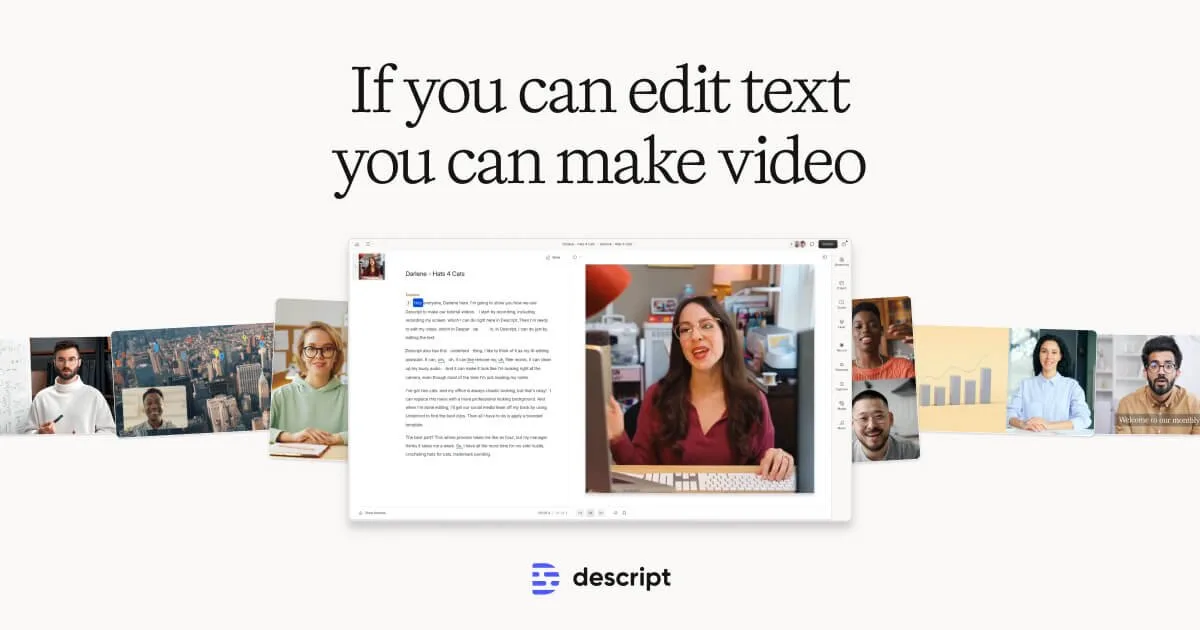
For creators whose work centers on editing speech-based audio and video, yes, Descript is worth its price in 2026 because its AI-powered, text-based editing significantly accelerates production workflows, saving valuable time and effort. It excels for users who need transcription accuracy and a simple editing interface.
Descript is an all-in-one, AI-driven platform that revolutionizes audio and video editing by allowing you to modify media as easily as editing a text document. The software automatically transcribes your files, and any edits made to the transcript are instantly applied to the audio or video.
Looking for more AI tools? Explore 500+ ranked options at top10k.com before deciding.
This tool is specifically designed for podcasters, YouTubers, marketers, and educators who work extensively with dialogue-heavy content. This review will analyze its core features, pricing structure, and overall value proposition to help you determine if it is the right investment for your creative needs.
Why Is Descript Considered Worth the Cost in 2026?
Descript is considered worth the cost because it combines multiple tools into a single subscription, offers powerful AI features that save hours of manual labor, and dramatically speeds up the editing process for spoken-word content. We will examine its value verdict, ideal user profiles, and overall benefits. To determine if Descript is a worthwhile investment for your specific needs, let's explore who benefits most from its unique capabilities.
What Is the Final Verdict on Descript's Value?

The final verdict is that Descript provides exceptional value for users focused on editing podcasts, interviews, or talking-head videos quickly and intuitively. Its return on investment is realized through massive time savings from features that automate tedious tasks. For example, the ability to edit video by deleting text, remove filler words with a single click, and use AI tools like Overdub and Studio Sound streamlines production. However, its value decreases for creators needing advanced color grading, complex visual effects, or traditional multi-cam editing, as it is not designed to replace specialized video NLEs.
Who Should Consider Paying for Descript?

You should pay for Descript if you are a podcaster, YouTuber, course creator, or marketer who regularly produces dialogue-centric content. These creators gain the most from its text-based editing, which simplifies removing mistakes and restructuring narratives efficiently. Content repurposing teams also find significant value in its ability to quickly generate clips, social media videos, and audiograms from longer recordings. This makes it an ideal tool for maximizing the reach of a single piece of content across multiple platforms with minimal extra effort.
What Is the Primary Benefit of Using Descript?

The primary benefit of using Descript is the profound reduction in editing time for any content based on the spoken word. The text-based workflow eliminates the need to scrub through timelines to find and cut specific phrases or mistakes. Instead, you can locate and edit content by simply searching the transcript, a process that is orders of magnitude faster than traditional methods. This efficiency allows creators to produce more content in less time, directly impacting their productivity and output.
What Exactly Is Descript and How Does It Work?
Descript is a collaborative, AI-powered audio and video editor that operates like a word processor, making content creation more accessible and intuitive. Its core functionality is text-based media editing, which begins by automatically transcribing uploaded files with high accuracy. This process allows users to edit their media by manipulating the text transcript, a groundbreaking approach that lowers the technical barrier to producing professional content. We will now detail its key features and weigh its pros and cons.
What Are the Key Features of Descript?
Descript's key features integrate recording, transcription, and editing into a unified, seamless platform designed to optimize the content creation workflow. These functionalities are engineered to provide a comprehensive solution from initial recording to final export. Let's delve into the standout features that define the Descript user experience.
- Text-Based Media Editing: This is Descript's signature feature, allowing you to cut, copy, and delete sections of audio or video by editing the corresponding text in the transcript. This method makes the editing process as intuitive as working in a standard document.
- Automatic and Human-Powered Transcription: The platform provides fast, AI-driven transcription immediately after a file is uploaded. For projects that demand the highest level of accuracy, users can order professional "White-glove" human transcription services directly within the application.
- Overdub AI Voice Cloning: This powerful feature lets you create an ultra-realistic digital clone of your voice. With Overdub, you can correct misspoken words or add new sentences to a recording simply by typing the text, eliminating the need for re-recording small sections.
- Studio Sound: Studio Sound is a one-click audio enhancement tool that uses AI algorithms to remove background noise, eliminate echo, and professionally equalize voice frequencies. It can significantly improve the quality of recordings made with consumer-grade equipment.
- Filler Word Removal: Descript's AI can automatically detect and remove filler words such as "um," "uh," "like," and "you know" from both the transcript and the media file. This feature saves editors countless hours of tedious manual cleanup.
- Screen and Camera Recording: The application includes a built-in recorder for capturing your screen, webcam, or both simultaneously. This is perfect for creating software tutorials, educational presentations, and video messages for remote teams.
- Comprehensive Podcasting Suite: Descript offers a robust set of tools tailored for podcasters, including multi-track recording, automatic audio crossfades between edits, and direct publishing integrations with major podcast hosting platforms.
What Are the Pros and Cons of Using Descript?
Descript presents a uniquely powerful workflow, yet it is not without certain limitations. Its main advantages are its speed and user-friendliness for dialogue-heavy projects, while its disadvantages become apparent in more demanding video production contexts. A clear understanding of these pros and cons is essential for determining if it aligns with your creative requirements.
The following table outlines the primary pros and cons of using Descript for content creation. Reading this table will help you quickly assess whether the platform's strengths align with your needs and if its weaknesses are potential deal-breakers for your workflow.
Comparing alternatives? Discover the full ranked list on https://top10k.com before committing to any single platform.
| Pros (Advantages) | Cons (Disadvantages) |
|---|---|
| Intuitive Text-Based Workflow: The editing process is as simple as editing a document, making it accessible to beginners. | Limited Advanced Video Features: Lacks sophisticated color grading, keyframing, and extensive visual effects plugins. |
| Time-Saving AI Features: Tools like Overdub and Filler Word Removal automate tasks that are time-consuming in other editors. | Performance Issues with Large Files: Can become slow or unstable when handling very long recordings or complex multi-track projects. |
| Highly Accurate Transcription: The AI transcription is fast and reliable, providing a solid foundation for editing. | Cloud-Based Dependency: Requires a stable internet connection for syncing and some features, which can be a limitation for offline work. |
| All-in-One Platform: Combines recording, transcribing, editing, and collaboration, reducing the need for multiple software subscriptions. | Subscription Model: The recurring cost may be a drawback for users on a tight budget or those who edit infrequently. |
| Excellent for Collaboration: Built for teams, it allows multiple users to comment and edit projects in real-time, similar to Google Docs. | Learning Curve for Overdub: While powerful, mastering the cadence and tone of the AI voice requires practice and adjustment. |
How Are Descript's Pricing Plans Structured?
Descript structures its pricing across several tiers to accommodate a wide spectrum of users, from hobbyists to large professional teams. The plans include a Free, Creator, and Pro tier, each offering different limits on features like transcription hours and access to advanced AI tools. Additionally, a custom Enterprise plan is available for large organizations. According to the official website, this tiered approach ensures users only pay for the level of service they require. Let's examine how these plans compare.
How Do the Free and Paid Plans Compare?
The free and paid plans differ mainly in their allowances for transcription hours, video export quality, and access to premium AI features. The Free plan serves as an excellent entry point, while the Creator and Pro plans unlock the platform's full capabilities for dedicated content creators.
This table provides a direct comparison of Descript's main pricing tiers. Use this information to determine which plan offers the right balance of features and usage limits for your budget and production needs.
| Feature | Free Plan | Creator Plan | Pro Plan |
|---|---|---|---|
| Price | $0 | $12/editor/month (billed annually) | $24/editor/month (billed annually) |
| Transcription Hours | 1 hour/month | 10 hours/month | 30 hours/month |
| Video Export Resolution | Up to 720p with watermark | Up to 4K without watermark | Up to 4K without watermark |
| Filler Word Removal | Limited ("um", "uh") | Unlimited | Unlimited |
| Overdub (AI Voice) | Limited vocabulary | Unlimited vocabulary | Unlimited vocabulary |
| Studio Sound | Yes | Yes | Yes |
| AI Green Screen | No | Yes | Yes |
| Publishing Integrations | No | Yes | Yes |
Is There a Free Version of Descript?
Yes, Descript provides a functional and generous free version that is ideal for small projects or for users wishing to evaluate the software before upgrading. This plan offers a comprehensive introduction to the core text-based editing workflow and its benefits. However, the free version includes specific limitations, such as a one-hour monthly transcription cap and a Descript watermark on all video exports. While excellent for trial purposes, these restrictions make it impractical for consistent content production.
What Are the Primary Drawbacks of Descript?
While Descript is a powerful tool, its primary drawbacks include limited advanced video editing capabilities, potential performance issues with large files, and a dependency on a cloud-based infrastructure. These limitations are important considerations for professional video editors or users with specific technical requirements. Understanding these weaknesses helps provide a balanced perspective on the software's overall utility.
Does It Lack Advanced Video Editing Features?
Yes, Descript lacks the advanced video editing features found in traditional non-linear editors (NLEs) like Adobe Premiere Pro or DaVinci Resolve. Its video editing tools are designed for simplicity and speed, not for complex visual storytelling. For instance, it does not offer sophisticated color grading panels, advanced keyframe animation controls, or support for third-party visual effects plugins. This makes it unsuitable for projects that require cinematic quality or intricate motion graphics, which remain the domain of specialized video software.
Can It Handle Large and Complex Projects?
Descript can struggle with performance when handling very large files or complex, multi-track projects. Users have reported that the application may become slow, laggy, or occasionally unstable when projects exceed a few hours in length or involve many layers of audio and video. While the company continuously works on performance optimization, creators working on feature-length documentaries or intricate multi-speaker podcasts may find a traditional NLE to be more reliable for managing heavy project loads.
What Are the Main Alternatives to Descript?
Although Descript excels at text-based editing, several key alternatives cater to different user needs, workflows, and budgets in the content creation market. The best alternative for you will depend on whether your priority is traditional editing power, standalone transcription services, or specialized podcasting tools. Exploring these competitors helps to better define Descript's unique value proposition. Many creators also consult resources like top10k.com for detailed software comparisons.
How Does Descript Compare to Traditional Video Editors?
Descript's text-based editing is fundamentally different from the timeline-based approach of traditional NLEs like Adobe Premiere Pro or Final Cut Pro. Traditional editors provide granular control over every visual and audio element, making them superior for cinematic projects, intricate visual effects, and precise multi-track arrangements. This level of control, however, is accompanied by a much steeper learning curve. In contrast, Descript prioritizes speed and simplicity for dialogue-focused editing, making it significantly faster for tasks like removing verbal mistakes or restructuring an interview.
What Are Some Direct Competitors?
Direct competitors to Descript often focus on specific aspects of its functionality, such as transcription, audio editing, or podcasting.
- For Transcription: Services like Trint and Otter.ai offer highly accurate, AI-powered transcription with collaborative features, but they lack Descript's integrated audio and video editing capabilities.
- For Podcasting: Tools like Hindenburg Journalist and Adobe Audition provide more advanced audio editing, mixing, and mastering features tailored for professional audio production, but they do not offer a text-based editing workflow.
- For Integrated Editing: Riverside.fm is a strong competitor that combines high-quality remote recording with an integrated, text-based editor. While its recording quality is often considered superior, Descript's editing suite and AI features are currently more mature and comprehensive.
Final Thoughts
Descript has solidified its position as an essential tool for a significant and growing segment of the creator economy. Its revolutionary approach to editing saves creators countless hours, and its suite of AI-powered features delivers a value that frequently surpasses its subscription cost. For podcasters, educators, YouTubers focused on commentary, and marketing teams producing video content at scale, Descript is a decisive winner in 2026.
It does not aim to replace traditional NLEs like Premiere Pro for complex visual narratives, and that is not its purpose. Instead, it solves a different, critical problem: making the process of editing spoken content as simple and efficient as possible. If your work revolves around the spoken word, investing in a Descript subscription is one of the most intelligent productivity decisions you can make. As the platform continues to evolve, its value proposition only grows stronger. For more reviews on the latest creator tools, you can explore resources like top10k.com.
Ready to revolutionize your editing workflow? https://capcutaffiliateprogram.pxf.io/R067oN
For a broader look at AI tools across every category, visit top10k.com to explore the full collection.